By Anthony Moussa, President, Moo IT Solutions | Totowa, NJ
It’s 2:47 AM. Your office is dark, your team is asleep, and somewhere on one of your computers a program that looks like ordinary software quietly starts to run.
Who notices?
For the businesses we protect, the answer is our 24/7 SOC monitoring team. A SOC (security operations center) is a group of security analysts and tools that watch your computers and network around the clock, investigate anything suspicious and act fast when something is real. Think of it as a night watchman for your data. Ours even has a mascot: Rocky the owl, who works the night shift so you don’t have to.
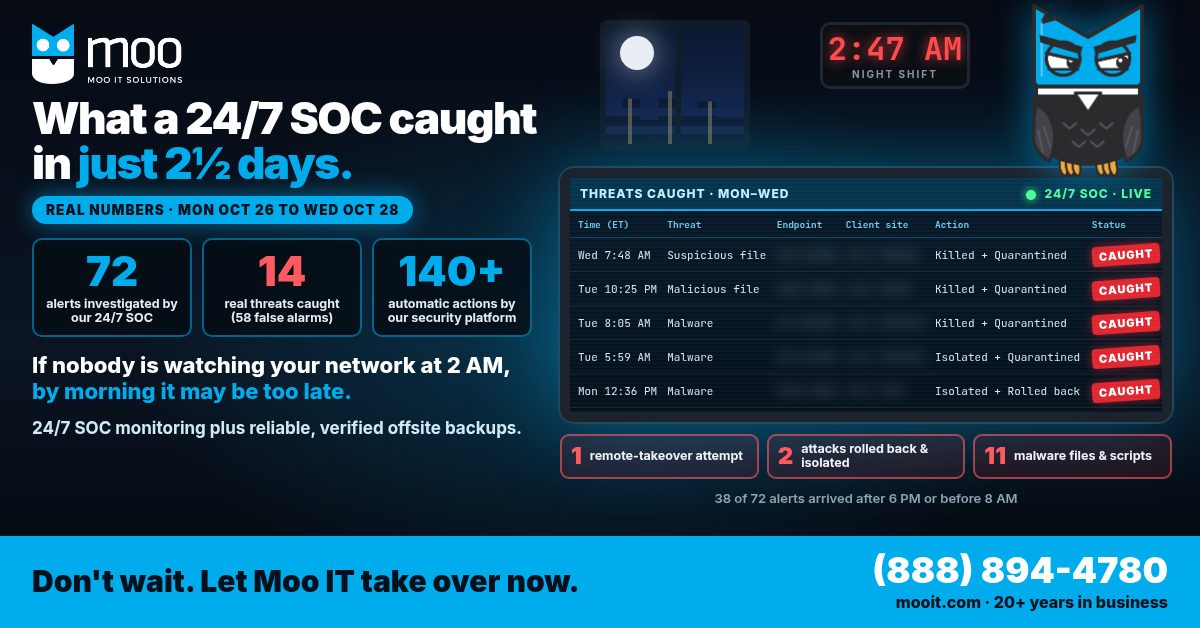
Talk is cheap, so here are real numbers from just 2½ days this week.
The real numbers: Monday midnight to Wednesday morning
From 12:00 AM on Monday, October 26 to about 10:45 AM on Wednesday, October 28 (Eastern), across the businesses Moo IT protects:
| What happened | Count |
|---|---|
| Security alerts investigated by our 24/7 SOC | 72 |
| Real threats caught | 14 |
| False alarms (checked and cleared) | 58 |
| Automatic actions taken by our security platform | 140+ |
| Alerts that arrived after 6 PM or before 8 AM | 38 of 72 |
That’s 14 real threats in under three days, and more than half of all alerts arrived while most offices were empty.
What the 14 real threats were, in plain English
You don’t need to know the technical names. Here’s what they could have meant for a business owner.
One could have handed a stranger remote control of a computer overnight
Imagine someone you’ve never met sitting at an employee’s desk at 3 AM, opening files, reading email and moving through your network, while the office is empty. That’s what one of these threats could have done. Once an attacker has the keyboard, everything else gets easier.
Two had already started changing files
Two threats were already at work, changing files on the computers they landed on. Our platform rolled back the changes and cut those computers off from the rest of the network automatically, so the problem couldn’t spread to other machines. Files changing on their own is one of the early warning signs of ransomware. One of those rollbacks was only partial, which is a good reminder of why the backup part of this story matters (more on that below).
The rest were malicious programs dressed up as everyday software
The remaining threats were malicious programs and scripts. Several were disguised as everyday software, the kind of thing an employee might download or open without a second thought. Nobody did anything wrong. That’s the point: the disguise is the attack.
Each of these 14 is how a breach or a ransomware attack begins.
Why 2 AM matters: more than half the alerts came after hours
38 of the 72 alerts arrived after 6 PM or before 8 AM, when most offices are empty.
That isn’t a coincidence. Attackers know when you’re not looking. The FBI and CISA have warned that ransomware groups like to strike on nights, weekends and holidays, when businesses have fewer people watching, because it gives them a head start (CISA).
If nobody is watching your network at 2 AM, by morning it may be too late. A few hours is plenty of time for an attacker to lock files, copy data or spread from one computer to many. By the time someone walks in with a coffee, the damage is done.
Why 58 false alarms is part of the story
Most of the alerts this week, 58 of 72, turned out to be false alarms. That’s normal, and it’s exactly why you need people watching, not just software.
Security tools are designed to be suspicious. Somebody has to look at every alert, decide whether it’s a real attack or a harmless update, and act on the real ones right away. Inside a small or mid-sized business, that “somebody” is usually no one, or it’s an office manager who gets an email alert they don’t understand at 11 PM. A 24/7 SOC does that sorting all day and all night, so the 14 real threats don’t get lost in the noise.
What 24/7 SOC monitoring actually does for your business
This is what people in our industry call managed detection and response, or MDR. In plain terms, it comes down to three jobs:
- Watch. Every protected computer reports suspicious activity, any hour of the day.
- Act automatically. When something is clearly bad, the security platform responds in seconds. This week, it shut down malicious programs 72 times, quarantined (locked away) suspicious files 70 times, cleaned up 2 infections, rolled back file changes twice and isolated 2 computers from the network on its own.
- Investigate. Analysts in our 24/7 SOC review the alerts, confirm what’s real, clear what isn’t and follow up so the problem is actually handled.
You can read more about how this works on our managed SOC and MDR monitoring and response pages.
Monitoring catches the attack. Backups get you back.
Watching around the clock is half the plan. The other half is being able to recover if something still gets through, a file gets damaged, or a rollback isn’t complete.
That’s why Moo IT pairs 24/7 SOC monitoring with reliable, verified offsite backups. “Verified” matters. A backup nobody has tested is a hope, not a plan. CISA recommends keeping offline, encrypted backups of critical data and regularly testing that you can actually restore them, because many ransomware attacks go looking for backups to destroy first (CISA #StopRansomware Guide).
See how we handle this on our backup and disaster recovery page.
What this looks like for your business
- Property managers run tenant portals, rent payments and owner reports that can’t go dark at the start of the month. A locked file server on the 1st is a very bad day. (Real estate IT services)
- Law firms hold privileged client files and court deadlines. A stranger with remote control of one attorney’s computer overnight is a client-trust problem, not just an IT problem. (Law firm IT)
- Auto dealers depend on deal files, financing paperwork and customer data. If systems are down when the showroom opens, deals stall. (Dealership IT)
- Construction companies run estimates, bids and payroll from the office while crews are out. A ransomware attack can stall a job site that never touched a computer. (Construction IT services)
Cybersecurity monitoring for small business: 3 questions to ask tomorrow
You don’t need to be technical to check where you stand. Ask whoever handles your IT:
- Who is watching our network at 2 AM tonight? A name or a team, not “the software sends an email.”
- When something is real, how fast does it get shut down, and who decides? Minutes matter more than reports.
- When did we last restore something from our backups, and are they stored offsite? If no one can remember, that’s your answer.
If any answer is “I’m not sure,” a cyber risk assessment is a fast way to find out where the gaps are.
How Moo IT helps
Moo IT Solutions has been in business for more than 20 years, since 2006, providing managed IT services and cybersecurity to businesses across Northern New Jersey and the New York City area from our office in Totowa, NJ. We give you 24/7 SOC monitoring, managed detection and response, and reliable, verified offsite backups, handled by a local team you can actually call.
Rocky doesn’t sleep. Your network shouldn’t go unwatched either.
Your vendors are a door in too: 3 questions to ask about vendor cyber risk.
Frequently asked questions
What is 24/7 SOC monitoring?
24/7 SOC monitoring means a security operations center, a team of security analysts backed by security tools, watches your computers and network around the clock. It investigates suspicious activity, separates real threats from false alarms and responds right away, including nights, weekends and holidays.
What is managed detection and response (MDR)?
Managed detection and response is a service where an outside security team detects threats on your computers and responds to them for you, often automatically. That can include shutting down malicious programs, quarantining files and isolating an infected computer from the network so a problem can’t spread.
Does a small business really need 24/7 cybersecurity monitoring?
In just 2½ days this week, our 24/7 SOC caught 14 real threats across the businesses we protect, and 38 of 72 alerts arrived after 6 PM or before 8 AM. Attackers don’t check the size of your company or your office hours, so cybersecurity monitoring for small business matters as much as it does for large ones.
If we have 24/7 monitoring, do we still need backups?
Yes. Monitoring helps catch attacks early, but no tool can promise to catch everything, and some damage can happen in the first minutes. Reliable, verified offsite backups are how you get your files and systems back if something still goes wrong.
Do you serve businesses outside Totowa?
Yes. Moo IT is based in Totowa, NJ and supports businesses across Northern New Jersey and the New York City area.
Don’t wait. Let Moo IT take over now.
If nobody is watching your network at 2 AM, by morning it may be too late. Call Moo IT Solutions at (888) 894-4780 or request a consultation and we’ll show you what 24/7 SOC monitoring and verified offsite backups would look like for your business.
Already a Moo IT client? Support is available at (973) 227-3747.
About the author: Anthony Moussa is President of Moo IT Solutions and has worked in IT for 28 years. He leads Moo IT’s managed IT and cybersecurity team in Totowa, NJ.